Create the orders directly through the buy and sell menu or pre-create them from Spot Presets • Auto Orders
Access the orders menu by running the /orders command.
You will be prompted to the following menu, where you can view the coins with active orders.
Select the coin for which you want to open the orders menu. The menu shown in the image below will appear.
This menu provides an overview of all your current open orders for the selected coin. By clicking 🗑️ Delete Order, you can cancel the corresponding order displayed on the left.

Dev Sell
Choose whether to automatically sell the specified amount if the Dev sells any of their tokens. If enabled, the bot will ignore the set profit/loss percentage and only trigger a sale when the Dev sells.
🟢: Active
🔴: Inactive
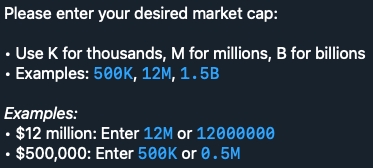
Market Cap
Enter the target market cap value.
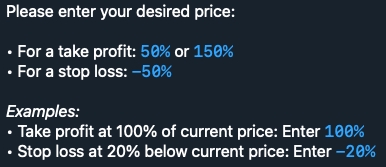
Price
Enter the percentage of the current price at which you want to create the order.
Create Limit Order
Create the limit order.
Back
Return to the previous menu.
Refresh
Refresh the menu.
Close
Close the current menu.
Buy Amount
Choose the ETH amount to buy.
Please enter your desired amount: (ETH, %, hours)
Expiry
Set the order expiration time in hours (eg. 6).
Please enter your desired amount: (ETH, %, hours)
Buy Gas
Set the transaction gas (Max Priority Fee) for buying. Max Fee is automatically calculated using the formula: Base Fee + (Priority Fee × 2).
Please enter your desired buy fee amount in GWEI:
Slippage
Set the buy slippage percentage.
Please enter your desired amount: (ETH, %, hours)

Start a regular Selltask by entering the token address.
Click 📈 Limit Orders.
Sell Amount
Choose the ETH amount to sell.
Enter the % for the Take Profit and Stop Loss.
Please enter your desired amount: (ETH, %, hours)
Expiry
Set the order expiration time in hours (eg. 6H).
Please enter your desired amount: (ETH, %, hours)
Sell Gas
Set the transaction gas (Max Priority Fee) for selling. Max Fee is automatically calculated using the formula: Base Fee + (Priority Fee × 2).
Please enter your desired amount: (ETH, %, hours)
Slippage
Set the buy slippage percentage.
Please enter your desired amount: (ETH, %, hours)
Follow the steps below to set up your take profit strategy.
Enter the Take Profit percentage with + in front of the value (eg. +50) in 💰 Market Cap or 💰 Price according to your target.
Setup the order as a regular Limit Sell one.
Follow the steps below to set up your stop loss strategy.
Enter the Stop Loss percentage with - in front of the value (eg. -50) in 💰 Market Cap or 💰 Price according to your target.
Setup the order as a regular Limit Sell one.
Dev Sell
Choose whether to automatically sell the specified amount if the Dev sells any of their tokens. If enabled, the bot will ignore the set profit/loss percentage and only trigger a sale when the Dev sells.
🟢: Active
🔴: Inactive
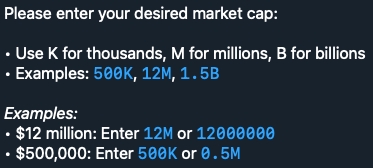
Market Cap
Enter the target market cap value.
Price
Enter the percentage of the current price at which you want to create the order.
Create Limit Order
Create the limit order.
Back
Return to the previous menu.
Refresh
Refresh the menu.
Close
Close the current menu.